
EV Connect
EV ConnectMaps & Navigation
4.3891.00 Reviews
- Version
- 6.1.4
- Installs
- 100.00K
- Age Rating
- Everyone
Screenshots
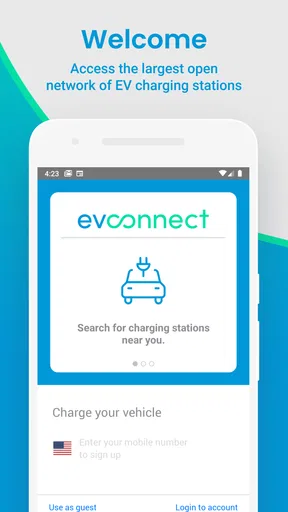
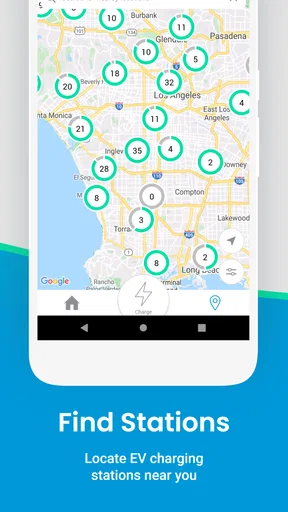
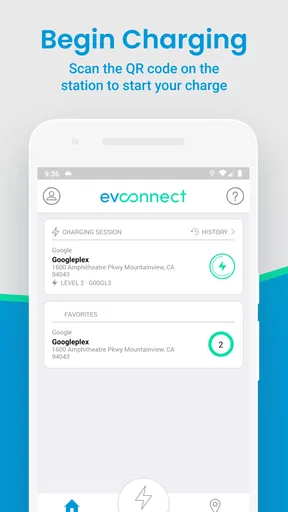
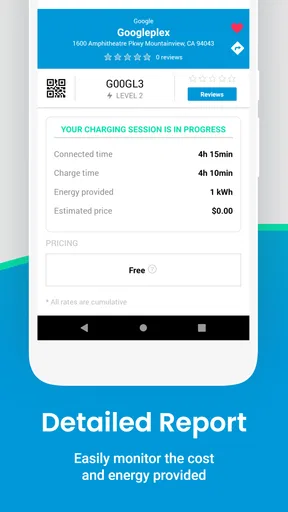
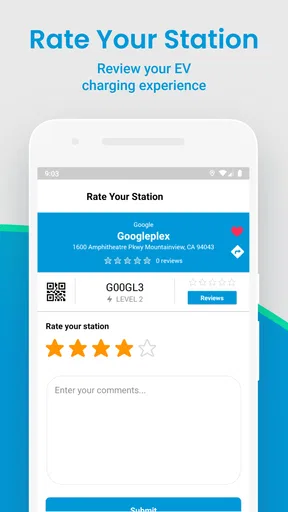
Our Review of EV Connect
 Analysis by Appyee
When I first opened EV Connect, I approached it as a practical tool rather than something I would browse for fun. It is a free EV charging app from EV Connect, built for finding and using charging locations while you are away from home. That focus makes it most useful at the exact moment an electric-car driver needs reassurance: when the battery is dropping, the route is longer than expected, or a planned charging stop needs checking before arrival.
My overall impression is that it is easier to understand once I treat it as a charging-network companion instead of a complete replacement for every navigation app. It can help me look for relevant charging options and organize the next stop, while a general maps app may still be better for the entire journey. That distinction matters because the best experience comes from giving each tool a clear job.
What to expect before your first charging search
EV Connect sits in the Maps & Navigation category, but its purpose is narrower than a conventional road-navigation app. I would install it when I want charging information to be central, not buried among restaurants, shops, traffic layers, and unrelated map results. For a new electric-car owner, that narrower purpose can make the first search less distracting.
The application has been available since June 9, 2017, and the current version is 6.1.4. It works on Android 7.0 or later, so it is accessible on many older devices as well as newer phones. The content rating is Everyone, which makes the presentation suitable for a broad audience. The app has passed one hundred thousand installs and holds a 4.3 average from around two thousand ratings, with 891 written reviews. Those figures suggest a reasonably established tool, although I would still judge a charging app by how well it serves my actual route.
The first thing I would not assume is that installing it guarantees a charger will be available when I arrive. A map can help me identify a possible stop, but real-world charging depends on location, vehicle compatibility, access conditions, and whether another driver is already using the equipment. I use the app to reduce uncertainty, not to remove the need for a sensible backup plan.
That is especially important on unfamiliar trips. I prefer to inspect a charging option before I am close to empty, note another plausible stop farther along the route, and keep enough battery margin to change direction if the first choice is inconvenient. This habit is more valuable than simply opening the map at the last minute.
Who will get the most from it
EV Connect makes the most sense for someone who regularly drives an electric vehicle and wants a dedicated way to think about charging. It can also help a new owner become more comfortable with the rhythm of electric travel: check the route, identify a suitable stop, allow time for charging, and continue with a fallback in mind.
I would be more cautious about recommending it as the only travel app for a driver who wants turn-by-turn guidance, traffic-aware routing, hotel planning, and charging in one uninterrupted workflow. A broad navigation service may be more convenient for that person. EV Connect is better when charging is the main question and the rest of the journey can be handled separately.
It is also worth remembering that a dedicated network app may feel most useful when the charging location you need is represented clearly in its search results. If your trips frequently cross many different charging providers, I would compare what appears here with another charging directory or the vehicle’s own navigation system before committing to a long detour.
Setting it up without overthinking the first screen
Because the app is free, getting started is low-risk. I would install it before a trip rather than waiting until the battery is low. The calmest first setup happens at home, with the phone charged and enough time to look through the map. That gives me a chance to understand the layout without making decisions under pressure.
My first useful step would be to search around a familiar destination, not an unknown town several hours away. A nearby search lets me see how charging locations are presented and whether the results make sense for places I already recognize. If I cannot interpret the local results comfortably, I would not want to rely on the app for a difficult journey yet.
I would then test the basic workflow in this order:
Open the map and search around the area where I expect to stop.
Choose a charging location that fits the direction of travel rather than selecting the closest point automatically.
Read the location information carefully before deciding it is suitable.
Keep a second option in mind instead of treating the first result as guaranteed.
This sequence sounds simple, but it prevents a common mistake: confusing “near me” with “useful for my journey.” A charger may be geographically close yet require a detour, sit on the wrong side of a divided road, or be inconvenient for the amount of time I have available. The map should support the decision, not make it for me.
I also recommend checking the app before leaving a familiar charging area. That is a small but important test of confidence. If I can find a sensible location, understand its details, and move from the result toward my next action without hesitation, I know the app is ready to be part of my travel routine.
The first successful action should be deliberately small
For a first-time user, success does not need to mean completing a long road trip. I would define it as finding a realistic charging stop and using that information to make a clear plan. For example, before driving across town, I might search near the destination, select a location that does not create an awkward detour, and save the result mentally as the place to check if the battery drops more than expected.
That approach teaches me the app’s practical value without adding unnecessary pressure. I learn how the map behaves, how much information a location provides, and whether I prefer to continue navigation in EV Connect or hand the destination to my usual map application. The first meaningful success is a reliable decision, not merely tapping through screens.
On a longer trip, I would repeat the process at two points: once before departure and again during a planned break. The first check helps me understand the route; the second reflects the reality of the journey. Traffic, timing, and battery use can change the best stop. Looking again is not wasted effort, especially when the next charging opportunity is far away.
A useful personal rule is to avoid waiting until the battery warning becomes the reason for opening the app. I get better results when charging research is part of trip preparation. That gives me time to compare locations and decide what to do if the preferred stop is busy or unsuitable.
Everyday scenario: the unplanned drop in battery
Imagine I leave work expecting to reach home comfortably, but heavy traffic and an extra errand use more energy than planned. Instead of driving around hoping to notice a charger, I open EV Connect while parked safely, search near the route home, and examine the available options. I choose one that keeps the detour reasonable, then use my normal navigation method if I want more detailed road guidance.
The important part of this scenario is the order. I do not search while moving, and I do not select a location solely because it appears first. I check whether it fits the direction I am already traveling, consider the remaining battery margin, and keep another option available. The app is useful here because it turns a vague worry into a concrete next stop.
For a new EV driver, this workflow can be reassuring. It does not require memorizing a network or planning every trip perfectly. It simply encourages a repeatable habit: stop safely, search deliberately, inspect the result, and leave room for a change of plan.
Where first-time users may become confused
The biggest source of confusion is the difference between discovering a charging location and knowing exactly what will happen there. A map result is a starting point. I still need to think about whether the location suits my vehicle, whether access is practical at the time I arrive, and whether the stop works with the rest of my schedule.
Another easy mistake is assuming that the closest result is the best result. I often prefer a slightly farther location if it lies directly along my route or gives me a more comfortable battery margin. A few extra minutes of driving can be preferable to a complicated turn, an inconvenient entrance, or arriving with too little energy to change plans.
New users may also wonder whether they should abandon their normal navigation app. I would not make that an either-or decision. EV Connect can handle the charging-focused part of the task, while a familiar maps application may provide the road context I prefer. Switching between the two is not a failure of the charging app; it is a practical way to use specialized tools together.
There is also a difference between planning a stop and planning the whole charging session. The app can help me identify where to go, but I should still consider how long I can reasonably remain there and what I will do afterward. If I am meeting someone, collecting a child, or making a time-sensitive appointment, the location’s convenience may matter more than its position on the map.
One of my more useful habits is to check a charging location from two perspectives: as a driver and as a pedestrian. As a driver, I care about the route and access. As a pedestrian, I care about what I can do while the vehicle is charging. A stop beside a useful destination may be better than one that is technically closer but leaves me waiting in an inconvenient place.
I would also avoid treating the app’s presence on my phone as proof that I have completed every necessary preparation. Before a major trip, I want the phone charged, the vehicle ready, and a backup route considered. This is not a criticism unique to EV Connect; it is a sensible boundary for any digital charging aid.
Three practical habits that improve the experience
Search before the battery becomes urgent. I can compare choices more calmly when I still have enough range to change direction.
Choose for the route, not just the distance. A location that sits naturally along the journey can be more useful than the nearest pin.
Use a two-app workflow when needed. Let EV Connect answer the charging question and use a conventional navigation tool for the wider drive if that feels clearer.
Build a fallback into the plan. I treat the selected charger as the preferred stop, not the only possible outcome.
These habits reveal the main trade-off. A focused charging app can reduce clutter and make the charging decision easier, but it may not replace the broader information I use for a complete journey. I value the focus, provided I do not mistake focus for total coverage.
When another option may suit you better
I would skip EV Connect as my primary tool if I rarely drive an electric vehicle, already have a vehicle system that handles charging stops well, or want one app to manage every part of a trip. In those cases, adding another map may create more switching than convenience.
I would also compare alternatives before a cross-country journey involving several charging networks. A vehicle’s built-in planner or a broader charging directory may fit better if it gives me the wider network view I need. The right choice depends on whether my priority is a dedicated charging search or a single integrated travel plan.
For local driving, however, the narrower approach can be an advantage. I do not need a large collection of travel features when my only question is where I can reasonably charge near work, home, or an upcoming destination. That is where a focused interface earns its place on my phone.
Taking the next step after the first successful search
Once I am comfortable finding a charging location, I would make EV Connect part of my pre-drive routine rather than an emergency button. Before unfamiliar trips, I check the likely charging area, identify a backup, and decide which app I want to use for the road itself. This takes little effort and makes the journey feel more controlled.
I would also test the workflow in different circumstances: a short local errand, a busy commuting day, and a longer weekend drive. Each situation exposes a different strength. Local use shows whether the map is quick and understandable; commuting shows whether it saves time; longer travel shows whether I need another planning tool beside it.
The developer, EV Connect, has kept the product centered on the practical problem of charging on the go. That simplicity is its strongest quality for me. I do not open it expecting entertainment or a complete travel concierge. I open it when I need charging information to take priority.
My final recommendation is straightforward: try it if you own an electric vehicle and want a free, dedicated charging companion, especially if you are still building confidence with route planning. Start with a familiar area, make one low-pressure search, and learn how the results fit with your usual navigation habits. The best way to use EV Connect is as a calm decision-making tool before range anxiety takes over.
With that expectation, EV Connect becomes genuinely useful. It will not remove every uncertainty from electric-car travel, and I would not rely on any single app without a backup plan. But for finding a charging stop, preparing for the next leg, and making an everyday battery problem feel manageable, it is a sensible addition to an EV driver’s toolkit.
Verdict
Strengths of EV Connect
- Find and start charging at compatible stations from one app.
- Live station status helps identify available chargers before you arrive.
- In-app navigation makes locating nearby EV Connect chargers easier.
- Charging history and session details help track your vehicle’s usage.
- Supports contactless payment options at participating charging stations.
Limitations of EV Connect
- Station availability data may occasionally be delayed or inaccurate.
- Charging speeds depend on the vehicle, connector, and individual station.
- Some stations may require account verification before a charging session.
- Prices and parking fees can vary significantly by location.
- Coverage is limited where EV Connect stations are not available.
Similar Picks in This Category
View All
Uber - Request a ride
Uber Technologies, Inc.4.7


inDrive. Rides with fair fares
® SUOL INNOVATIONS LTD4.8

Yandex Go: Taxi Food Delivery
Mikromobilnost LLC Belgrade4.8

Bolt: Request a Ride
Bolt Technology4.8

Rapido: Bike-Taxi, Auto & Cabs
Rapido Bike Taxi4.8
Frequently Asked Questions
What is EV Connect, and what can I use it for?
EV Connect is a mobile app designed to help electric vehicle drivers find and use compatible charging stations. After opening the app, you can browse charging locations, check station details, view availability when supported, and receive directions. It can also help you start and monitor charging sessions, review session information, and manage payments, depending on the station operator and the services available in your area.
Can I use EV Connect with any electric vehicle or charging station?
The app is intended for EV drivers, but compatibility depends on the vehicle, connector type, charging network, and individual station. Before traveling, check the station’s connector information, charging speed, access requirements, and operating status in the app. Some locations may be available only to certain vehicles, fleets, or customers, while roaming support can vary by region and network agreement.
Does EV Connect show real-time charger availability and pricing?
EV Connect may display station status, connector availability, charging speed, and pricing information, but the accuracy and level of detail can differ between locations. Some stations update their status in near real time, while others may experience delays or provide limited information. Always review the station details and applicable fees before beginning a session, especially at busy public chargers.
How do I start and pay for a charging session in EV Connect?
After selecting a compatible station, you may be able to start charging directly through the app by choosing the connector and following the on-screen instructions. Payment normally requires an account and an accepted payment method, although some stations may support alternative options such as a card reader or guest access. Pricing can include energy, time, session, parking, or network fees.
Does EV Connect require an account, and does it use location data?
Some basic station browsing may be possible without signing in, but an account is generally useful or required for features such as starting sessions, saving payment details, viewing charging history, and receiving notifications. The app may request location permission to show nearby chargers and provide navigation. You can manage permissions in your device settings, although restricting location access may reduce convenience.
